


SEO Migration Checklist: the one Topdog uses on every migration
Most site migrations that lose traffic fail on one thing: the URL mapping. If old URLs do not lead to the right new pages, Google treats the new site as a stranger, and rankings built over years disappear in weeks.
This is the checklist Topdog uses on every migration, from small redesigns to the Fass.se migration, where 15 million URLs became 150,000 without losing visibility in Google. It works as a site migration checklist for a domain change, a CMS migration, a website redesign or a new URL structure. Each step has a short explanation and a list you can tick off.
1. Before the project starts
A migration is decided long before anyone builds anything. These are the things we agree with the client before the project is signed, because changing them later costs traffic.
- The migration date and window are set and shared with everyone involved
- Slugs for pages, products and categories will stay the same, or change by one documented pattern
- Someone owns the slug decision: the dev team, the platform vendor or the agency
- No content changes are planned during the migration window
- If the design changes, all existing content blocks will carry over
- Planned content work is scheduled 2 to 3 months after launch
- SEO is involved before the new site is built, not after launch
2. Clean up long before the migration
The best migration work often happens months before the move. Most sites carry content that is outdated and gets no traffic from Google. There is no reason to map, redirect and migrate it.
The same goes for technical duplication. Companies often move from a poor CMS to a better one, and poor CMSs create duplicate URLs that have been patched with canonical tags for years. Those duplicates should be removed, not carried over to the new platform.
Do the cleanup well ahead of the migration, so it does not clash with the content freeze.
- List all content that is outdated and gets no clicks or rankings in Google
- Delete or merge it, and redirect pages that have backlinks to the most relevant page
- Find technical duplicates in the old CMS, such as parameter URLs and duplicate paths
- Make sure the new CMS does not create the same duplicates
- Finish the cleanup before the content freeze starts
3. URL mapping: the step that decides everything
Every old URL needs a clear destination on the new site. Without a complete mapping, visitors land on 404 pages, backlinks lose their value and rankings drop.
Most migrations are mapped by hand in a spreadsheet, one row per URL. That works for 50 pages and breaks at 5,000. Topdog maps old URLs to new ones with rules based on the slug, the last part of the URL. As long as a page, product or category keeps its slug, a rule catches it wherever it ends up in the new structure. The method works the same for 50 URLs as for 50,000, across any number of language markets.
| Can change freely | Must stay the same, or change by one pattern |
| Domain | Page and post slugs |
| CMS or platform | Product slugs |
| Site structure, navigation and menus | Category slugs |
| Category hierarchy |
A slug may change if every URL of that type changes the same way. For example, if the new platform adds an ID to every product (old-slug becomes old-slug-4821), one rule and a lookup table handle it. What does not work is renaming slugs one by one, by different people with different judgement.
- Crawl the old site to collect every URL
- Add URLs the crawl missed, from the CMS, the XML sitemap and the indexing report in Google Search Console
- Include image URLs and PDF files
- List the pages with the most clicks, rankings and conversions
- List the pages with the most valuable backlinks
- Map every old URL to the most relevant new URL
- Use rules on slugs wherever possible, not one row per URL
- Document any slug change as one pattern, with a lookup table for IDs
- Agree that no slug changes are decided during the build or discovered after launch
- Make sure all redirects are 301s and go straight to the final URL, with no chains
4. Test environment: always behind a password
The new site is built and tested in a separate environment before launch. It must always be behind a password. Noindex or robots.txt is not enough, because a test site that leaks into Google competes with the live site and can be indexed as duplicate content.
The test environment is where most errors are caught. Everything that will go live is checked here first.
- The test environment is behind a password
- All redirect rules are tested against the full list of old URLs
- Canonical tags point to the new URLs, not to old URLs or the test environment
- Page titles and meta descriptions have carried over unchanged
- Every content block on the old pages has a match on the new pages
- Internal links point directly to the new URLs
- Structured data, hreflang and the XML sitemap are in place
- A full crawl of the test site shows no broken links or unexpected noindex tags
5. Content freeze
During the migration window, the migration should be the only thing that changes. If page titles or copy are rewritten at the same time, nobody can tell afterwards whether a drop in traffic came from the move or from the new content.
The freeze applies to everyone who touches content: the content team, the product team and any outside agency or freelancer.
- No changes to page titles
- No changes to meta descriptions
- No changes to headings, copy or body text
- No content blocks removed or merged if the design changes (adding a small block is fine)
- Everyone who edits content knows the dates of the freeze
6. Launch day
Launch on a day and time with low traffic, and have both developers and SEO available for the first days. Most problems show up in the first hours and are cheap to fix if found early.
- Remove the password and any noindex from the new site
- Check that robots.txt does not block the new site
- Test the redirects on the live site against the full list of old URLs
- Crawl the new site and fix broken links and 404 pages right away
- Check that analytics and tracking work, and mark the launch date in analytics
- Test forms, checkout and other conversion points
- Submit the new XML sitemap in Google Search Console and Bing Webmaster Tools
- Keep the old XML sitemap available until the old URLs have been recrawled
- If the domain changes, use the Change of Address tool in Google Search Console
7. After launch
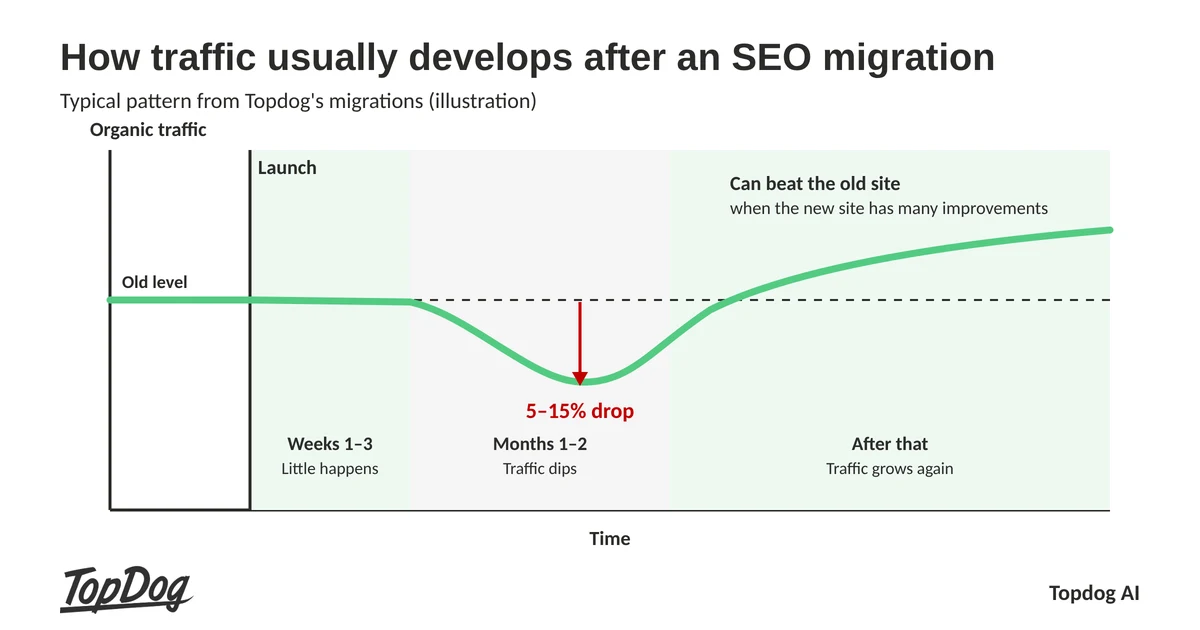
How traffic usually develops after a migration
Even a well-run migration follows a typical curve:
- Weeks 1 to 3: not much happens. Google is still crawling and processing the new URLs.
- Months 1 to 2: traffic usually drops by 5 to 15 percent while Google reassesses the site.
- After that: traffic usually grows again. If the new site has many improvements, it can end up performing better than the old one.
After about one month there is enough data to see what happened. We follow four things, each compared with the period before the move: clicks from Google, rankings, conversions and visibility in AI search services such as ChatGPT and Google AI Overviews.
Wait 2 to 3 months before starting new content work. Then the effect of the migration and the effect of the content changes can be kept apart.
- Monitor clicks, rankings and conversions daily during the first weeks
- Monitor indexing in Google Search Console
- Fix 404 pages and missing redirects as they show up
- Evaluate clicks, rankings, conversions and AI visibility after about one month
- Keep the redirects live for at least one year, preferably for good
- Start planned content work 2 to 3 months after launch
8. Questions to ask a migration partner
Use these questions when you choose an SEO partner for a migration. A partner with real experience answers them concretely, with examples.
- How do you handle redirects for the whole site, not just the most important pages?
- Do you map URLs by hand or with rules, and how does that scale to thousands of URLs?
- When in the project do you want to be involved?
- What do you need from us, and what is outside your scope?
- How do you test the new site before launch?
- What do you measure after launch, and when do you evaluate the result?
- Can you show migrations you have done, with numbers?
FAQ
What is the most important step in an SEO migration?
The URL mapping. Every old URL must lead to the right new page with a 301 redirect. Most traffic losses after a migration come from missing or wrong redirects.
How long should redirects stay live?
At least one year, and preferably for good. Old URLs keep getting visits from backlinks and bookmarks long after the move.
Can we change content during the migration?
We advise against it. Freeze page titles, meta descriptions and copy during the migration, and start content work 2 to 3 months after launch.
Is noindex enough to hide a test site?
No. Always put the test environment behind a password. Noindex and robots.txt can be missed, and a leaked test site competes with the live site.
How long does it take for traffic to recover after a migration?
Usually 2 to 3 months. Little happens in the first 3 weeks, traffic often drops 5 to 15 percent during months 1 and 2, and then it grows again. We evaluate the result after about one month.
What does an SEO migration cost?
At Topdog, an SEO migration costs SEK 50,000 to 250,000. A design-only change lands in the lower part of the range. Changing CMS, URLs and design at the same time, and cleaning out content that does not perform, lands in the upper part.


Christian Rudolf
VD och Sökmotorkonsult
Christian has +20 years of experience in SEO and digital marketing. His experience includes challenging sectors such as casino and finance, as well as global markets. What sets Christian apart in SEO is his focus on execution. This is the real challenge in SEO.

 +46 708 140833